NCE PowerCab vs ESU ECoS vs Zimo MX10: The Complete DCC Command Station Comparison
NCE PowerCab at £195, ESU ECoS at £597, Zimo MX10 at £1,050. Three DCC command stations at very different price points. This guide breaks down what each one actually delivers and who should buy which.

Three DCC systems. Three very different answers to the same question.
The NCE PowerCab costs £195. The ESU ECoS 2.5 costs £597. The Zimo MX10 costs £1,050 before you've added a handset or power supply. If you're wondering whether the top-end system is genuinely six times better than the entry-level one, that's precisely the right question, and the answer depends almost entirely on what your layout actually requires.
This article breaks down all three in detail: what each system delivers, where each one frustrates, what it genuinely costs to run, and which one suits which type of modeller.
The Three Contenders at a Glance
| System | Power Output | Protocol Support | Interface | UK Price | US Price |
|---|---|---|---|---|---|
| NCE PowerCab | 2A | DCC only | Handheld + LCD | £195 | $249.95 |
| ESU ECoS 2.5 (50220) | 6A (4A steady) | DCC, Motorola, Selectrix, M4 | 7" touch screen | £597 | $699.95 |
| Zimo MX10 | 20A | DCC, Motorola | Separate handset | £1,050 | POA |
One thing this table doesn't capture: the NCE PowerCab is a starter system with a ceiling. The ECoS and MX10 are both designed to run a layout indefinitely without replacement. That difference shapes every other decision in this comparison.
NCE PowerCab
What You Get
The PowerCab is a handheld unit that contains both the throttle and the DCC command station in one piece of hardware. Plug it into the power supply panel, connect the track leads, and you're running trains. Setup takes about ten minutes from the box. Less if you've done it before.
The system delivers 2 amps of track power, enough for four OO or HO scale locomotives running simultaneously, or eight N gauge. For a small to medium home layout, that's perfectly adequate. The LCD display shows the locomotive address, speed, and active functions. There are no menus to navigate before you can drive a train. The interface is direct and the learning curve is shallow.
NCE's reputation for ease of use is well-earned here. The PowerCab has been a popular entry point for new DCC modellers for years, and the community knowledge base reflects that. If you encounter any setup issue, someone has already solved it and posted the answer.
Programming is handled on a dedicated programming track output, and the PowerCab gives you the cleanest, safest low-current programming mode of any NCE system. Combined with JMRI DecoderPro (free, cross-platform software), CV reading and writing is thorough and well-documented. Without JMRI, the PowerCab won't read CV values back from a decoder. A genuine limitation worth knowing before you buy.
In the UK, the PowerCab is stocked by Rails of Sheffield, Coastal DCC, and Hattons. It's available on Amazon UK as the 524-042 UK version with the correct 240VAC power supply. In the US, the 524-025 version is on Amazon US at $249.95.
The Walkaround Problem
The PowerCab looks like a walkaround throttle. The physical form factor is handheld. But unless you add the SB5 SmartBooster first, it isn't one.
The DCC booster lives inside the PowerCab. If you unplug the unit to walk around your layout, you kill the track power. Every locomotive stops. Full stop.
The solution is the NCE SB5 SmartBooster, which takes over track power duty and frees the PowerCab to roam. Without it, your operating range is limited to the supplied six-foot flat cable. The SB5-UK (524-037) costs around £260 from Coastal DCC and similar UK specialists, including the proper UK power supply. The US 5240027 variant runs around $135 on Amazon US. If walkaround operation matters to you, factor it in from the start.
This catches a lot of buyers out. NCE could have been clearer about it in the marketing. The system is excellent. Just know what you're buying.
Expanding the PowerCab
The PowerCab supports up to four operators total, including the main unit. For a home layout with one or two operators, that's fine. For a club setup or larger exhibition layout, you'll hit the ceiling quickly.
The maximum locomotive roster is 127 addresses. Again, adequate for most home layouts, but a firm limit.
Expansion beyond that means stepping up to the NCE PH-Pro system rather than adding to the PowerCab. The decoders you've already installed stay in place: they're NMRA standard and work on any DCC system. But the command station itself gets replaced, not expanded.
Software Integration
The PowerCab works well with JMRI via a USB programming cable (the NCE USB Interface, available from most NCE stockists). JMRI gives you full CV reading, the locomotive roster, and layout automation via the PowerCab's DCC output. For a home layout running DecoderPro and basic automation, the PowerCab plus JMRI is a capable and cost-effective combination.
Who the PowerCab Is For
Beginners moving from analogue. Modellers with compact or medium layouts. Anyone who wants to spend the bulk of their budget on locomotives and rolling stock rather than the control system. The PowerCab is a reliable, well-supported entry point that won't hold back a sensible home layout.
It's not the right choice if you need more than 2 amps, want multi-operator walkaround without adding hardware, or are building a layout you intend to keep expanding indefinitely.
ESU ECoS 2.5 (Model 50220)
What You Get
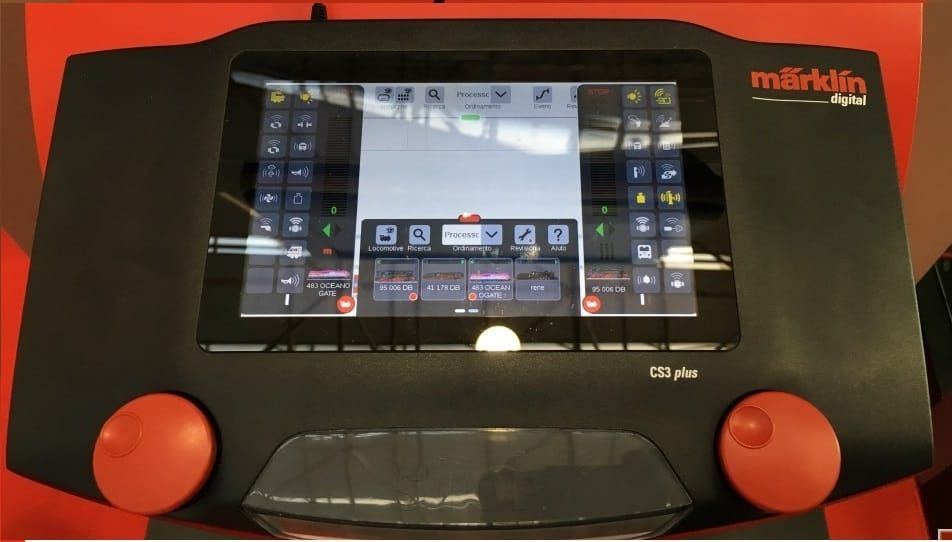
The ESU ECoS is a standalone command station with a seven-inch capacitive touch screen, a built-in 6A booster, two physical throttle knobs, and enough processing power to manage a serious layout without a separate computer.
ESU is a German manufacturer with a long track record in DCC electronics. The ECoS 2.5 (model 50220) is their current flagship command station, updated from the earlier 50210. The build quality is excellent. The firmware is actively maintained and updated. The hardware feels like it will outlast several layout rebuilds.
Multi-protocol support is a headline feature: the ECoS runs DCC decoders, Märklin Motorola, Selectrix, and M4 (Märklin mfx) without additional hardware. For most UK and US modellers running NMRA DCC stock, the multi-protocol capability is irrelevant day-to-day. But it means the system doesn't exclude anything. If you ever acquire Märklin or Trix stock, the ECoS handles it natively.
In the UK, Coastal DCC stocks the ECoS 2.5 at £596.74. Peters Spares, Model Market, and Hattons also carry it. In the US, Tony's Trains and SBS4DCC both list it at approximately $699.95. The ESU ECoS 50220 also turns up on eBay including new-boxed stock from US dealers.
The Touchscreen in Practice
The 7" screen is what separates the ECoS from most of its competition. You can build a graphic representation of your layout directly on the screen (point symbols, signals, routes) and control them by touch. Pressing a point icon throws the actual turnout. Tapping a signal icon changes its aspect. I've seen this used on a complex 12-road fiddle yard and it turns a wiring headache into something almost elegant.
Not everyone uses it that way. Some modellers connect the ECoS to JMRI or Rocrail via Ethernet and use the touch screen primarily for locomotive control, handling layout automation in software instead. Both approaches work. The ECoS is flexible enough to support either.
The two physical throttle knobs give direct hands-on control of two locomotives simultaneously, without touching the screen at all. For everyday running, working a yard or watching a train circuit the layout, the knobs are faster and more tactile than any touchscreen control.
Protocol, Connectivity, and RailCom
The ECoS speaks LocoNet and has an ECoSlink bus for connecting additional ESU devices. Ethernet is built in for JMRI, Rocrail, and other layout software. The USB port handles programming and firmware updates.
RailCom support is full. The ECoS receives RailCom data from decoders that send it, enabling automatic address detection and, with the right hardware, locomotive position reporting on the layout. This is particularly useful for automated block detection setups.
One practical note on third-party accessories: the ECoS is not entirely plug-and-play with accessories from every other DCC brand. Some accessory decoders from other manufacturers don't behave as expected when connected via LocoNet or ECoSlink. Test specific accessories before committing to a large purchase.
Software Integration
JMRI connects to the ECoS via Ethernet and the integration is solid. Most ECoS features are accessible through JMRI's throttles and DecoderPro handles decoder programming cleanly. Rocrail is also well-supported and the two work well together for timetable automation.
The ECoS's own native CV editor is functional but not as flexible as DecoderPro for complex decoder configurations. For modellers who do a lot of decoder programming across different brands, JMRI is the better tool even with the ECoS in the chain.
Who the ECoS Is For
Intermediate to advanced modellers who want a single device managing trains, points, and basic layout automation without a separate computer. Modellers running 15+ locomotives regularly. Anyone who wants multi-protocol support as future insurance. Layouts where visual point control from a central device is a priority.
Not the right fit for beginners who'll find the feature set overwhelming on day one, or for modellers who already use JMRI extensively and see the touch screen as something they'll never look at.
Zimo MX10
What You Get
The Zimo MX10 is, by a significant margin, the most powerful command station in this comparison. The 20A output isn't just for garden-scale G-gauge layouts. Modellers running HO or OO on large permanent layouts appreciate having power headroom that will never be the limiting factor.
Zimo is an Austrian manufacturer with a devoted following among serious modellers. The MX10 sits at the top of their product range and was designed with exhibition-scale layouts in mind. It supports up to nine slave boosters, giving a theoretical combined output of 180A across a subdivided layout. Practically speaking, no home layout needs anything close to that. But the architecture means the system scales without compromise.
The MX10 itself is compact (18cm wide, 3cm high), with no fans and no heatsinks. Despite the 20A output, the unit stays cool under sustained load thanks to high-frequency switching regulators. That's genuinely unusual at this power level.
Built-in wireless is included. Additional throttles like the MX33 or MX33FU connect without any extra radio module or adaptor. Connectivity includes CAN bus for Zimo devices, LocoNet, Ethernet (LAN), and USB. The system supports 9,999 locomotive addresses and 2,048 accessory addresses.
In the UK, Coastal DCC lists the MX10 command station at £1,050. The STARTFU bundle (MX10 plus MX33FU wireless throttle plus 240W power supply) is £1,500. ZIMO UK is the UK distributor; their dealer network is listed at zimo-digital.co.uk/retailers.
In the US, SBS4DCC is the main stockist and carries the MX10 with various bundle configurations. Pricing varies by package. The Zimo MX10 is less widely distributed in the US than in the UK and Europe, so check availability with SBS4DCC directly for current stock and pricing.
The Documentation Problem
The MX10 is exceptional hardware with documentation that doesn't match it. The English manual consistently lags behind firmware releases, sometimes by months. Community resources (the RMweb DCC forum, Zimo's own user group, YouTube) fill the gaps, but new users shouldn't expect to work from the manual alone.
This is not a dealbreaker for modellers who are already comfortable with DCC systems and willing to dig for answers. For a beginner, it's a real barrier. The learning curve is steep compared to either the PowerCab or the ECoS.
Firmware and Longevity
Zimo updates firmware more often than any other manufacturer in this comparison. That's largely positive: bugs get fixed, features get added, and the hardware remains genuinely future-proof. It also means that setup guides and forum posts from 2021 or 2022 may describe workflows that have since changed.
The early MX10 firmware had a known consisting bug where a locomotive would drop its address from a multi-unit consist during speed adjustments. Current firmware has resolved the main issues. Keep the firmware current and check Zimo's release notes. They're published in detail.
Zimo Decoders and the System Integration Advantage
Where the MX10 argument becomes strongest is in combination with Zimo's own decoders.
Zimo decoders, particularly the MX636, MX645, and MX649 series for HO/OO, are widely regarded as among the best sound decoders available. The sound quality with a properly fitted speaker is genuinely better than most alternatives at comparable prices. The MX10 and Zimo decoders communicate at a level that other command stations can't access: advanced consists, direct sound triggering, and decoder-specific programming modes work more fully within the Zimo ecosystem than with a third-party command station.
If you're serious about DCC sound, particularly for OO locos running Zimo sound files, the MX10 is the system that gets the most out of them.
Software Integration
The MX10 connects to JMRI via LocoNet or USB. JMRI integration works for the essentials: throttle control, CV programming via DecoderPro, and basic block signalling. The more advanced Zimo-specific features aren't fully accessible through JMRI, but for most layout automation tasks it's functional.
For dedicated Zimo users, the ZUSI 3 simulator software also supports MX10 integration, which is useful for testing layout logic and automation sequences before wiring them up.
Who the MX10 Is For
Advanced modellers with large or complex permanent layouts. Exhibition operators who need serious expandability and power. Modellers who are building around Zimo decoders and want the best possible decoder-to-command station integration. Anyone who wants a system they will still be running in 20 years without replacement.
It's not suited to beginners, to modellers on a budget, or to anyone who wants to find community support easily in the US.
Head-to-Head by Use Case
A small to medium home layout (one to three loops or a point-to-point, up to 20 locomotives): The PowerCab handles this without breaking a sweat. Spend the money you save on decoders and scenery.
A medium to large permanent layout with multiple operators, 20+ locomotives, and turnout automation: The ECoS earns its price here. The 6A built-in booster, multi-operator support, and layout control via the touch screen handle the scale without requiring a separate computer.
A large or exhibition layout, or a setup where power headroom and maximum future expandability are non-negotiable: The MX10. Nothing else in this comparison comes close.
What It Actually Costs to Get Running
The stated prices don't tell the whole story.
PowerCab: The £195 / $249.95 base price is the starter cost. Most layouts need more. Add the SB5 SmartBooster for walkaround (around £260 in the UK with the proper UK power supply, $135 in the US) and a USB interface for CV programming (around £35). Realistic complete cost for a medium UK layout: £490 to £540. In the US: $420 to $470.
ESU ECoS: The £597 / $699.95 unit is closer to a complete solution out of the box. The 6A built-in booster covers most home layouts without a separate booster. The Mobile Control II wireless throttle (around £120) adds walkaround. Realistic complete cost: £700 to £850 depending on how many wireless throttles you need.
Zimo MX10: The command station at £1,050 needs a handset and power supply before it does anything. The STARTFU bundle at £1,500 is the realistic entry price (that includes the MX33FU wireless throttle and a 240W supply). A second wireless throttle adds around £300. Realistic complete cost: £1,500 to £1,800.
The difference between the PowerCab and MX10 complete-system costs (roughly £1,500) is a substantial decoder fleet. Be honest about what your layout actually needs before committing to the top end.
Decoders to Run Alongside Each System
Any NMRA-compliant decoder runs on all three systems. That said, each has natural pairings.
With the PowerCab: DCC Concepts Zen decoders are a popular UK choice for Bachmann and Hornby OO locos. In the US, TCS (Train Control Systems) decoders are well-regarded and work cleanly with NCE systems. For sound, Digitrax SDN144K0 and ESU LokSound 5 Mini both work well. ESU LokSound 5 (Amazon US) is one of the most capable sound decoders available at this price point.
With the ECoS: ESU's own LokSound 5 and LokPilot 5 decoders make the most sense. Full RailCom+ support, M4 protocol, and direct integration with the ECoS locomotive database. Addresses auto-populate and function mappings come with the decoder. For OO gauge, the ESU LokSound 5 in 21-pin MTC format fits most Bachmann and Heljan OO models directly.
With the MX10: Zimo's own decoder range is the natural match. The MX636 (8-pin), MX645 (21-pin MTC), and MX649 are the most commonly used in HO and OO. Sound quality from Zimo decoders with a properly fitted speaker is genuinely a step above most of the competition. The command station and decoder speak directly, giving you access to programming modes and sound triggers that aren't accessible from other systems.
Frequently Asked Questions
Can I upgrade from a PowerCab to an ECoS later?
Yes. Your decoders stay where they are. All three systems use the NMRA DCC signal standard. Sell the PowerCab (they hold their value well secondhand), enter your locomotive addresses into the new system, and carry on. The only work is re-entering the roster.
Does the ECoS work with JMRI?
Yes, via Ethernet. The ECoS appears as a supported command station in JMRI and most features are accessible through throttles and DecoderPro. Whether you need JMRI alongside the ECoS depends on how much decoder programming you do. The ECoS native CV editor handles basic tasks, but DecoderPro gives more flexibility with complex decoder configurations.
Is the Zimo MX10 worth it for a home layout?
For most home layouts, no. The MX10's advantages are in raw power and maximum expandability, neither of which most home layouts need. The ECoS gives a better feature-to-cost ratio for a permanent home layout. The MX10 makes more sense if you're building something large, exhibiting regularly, or running Zimo sound decoders and want the fullest possible integration.
Is Zimo well-supported in the US?
Less so than in the UK and Europe. SBS4DCC knows the system well and is the main US stockist, but the community support base is thinner than for NCE or Digitrax. Forum help is available but you'll need to look for it. If easy access to local club support or quick answers on US forums matters, NCE is the more practical choice.
What about the Roco Z21 or Digitrax?
Both are genuinely capable systems that didn't make the cut for this comparison purely for scope reasons. The Roco Z21 offers an excellent app, modern wireless-first design, and a competitive price. Worth a look if you're shopping in the mid-range. Digitrax has the largest installed base in the US and is the default at many clubs. A full DCC command station market comparison covering all four would be a different article.
Do I need separate boosters for a home layout?
Probably not. The ECoS at 6A and the MX10 at 20A both comfortably run any typical home layout as single-booster systems. The PowerCab's 2A can run short on a medium layout with several sound-equipped locomotives drawing more current at startup. That's the one scenario where the SB5 booster pays for itself even if you don't care about walkaround.
Prices correct at time of publication. Check retailer listings for current stock and pricing, particularly for the Zimo MX10 which is ordered to demand in many markets.